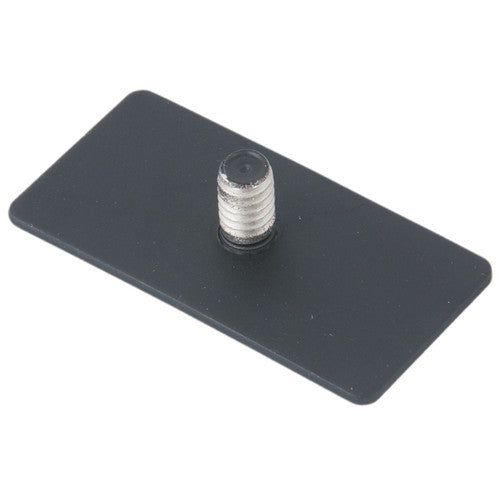

Light Stand Plate for LitePad Loop — take the Loop off the camera
Attaches to the LitePad Loop’s magnetic base. The plate’s 1/4"-20 accessory screw then attaches to a swivel arm, and in turn to a light stand or other support.

Image: Rosco
Use the Loop as a stand-mounted light
Free the Loop from the camera for use as a stand-mounted ring light.
- Fits the LitePad Loop’s magnetic base
- 1/4"-20 accessory screw connects to arms and supports
- Pairs with the LitePad Swivel Arm and a light stand
Off-camera Loop setups
Stand-mounted ring light
Loop → Light Stand Plate → Swivel Arm → light stand.
Portrait & beauty
Position the Loop independently of the camera.
Product & tabletop
Fix the Loop on a support for consistent product lighting.
What it is — and what it isn’t
Use it for
- LitePad Loop ring lights
- Swivel arms and supports with a female 1/4"-20
- Off-camera Loop setups
Don’t use it for
- LitePad Axiom or other LitePad panels
- Mounting directly to a 5/8" stand stud without an arm or adapter
- Supports not rated for the Loop and accessories
Getting the best result
- Attach the plate to the Loop’s magnetic base.
- Thread the 1/4"-20 accessory screw into a swivel arm (such as the LitePad Swivel Arm).
- Fit the arm to a light stand.
- Aim and lock everything before use.
Key details
| Brand | Rosco |
|---|---|
| Part number | 291600040002 |
| Fits | LitePad Loop (magnetic base) |
| Connection | 1/4"-20 accessory screw |
Common questions
How do I mount a LitePad Loop on a light stand?
Attach this plate to the Loop’s magnetic base, thread its 1/4"-20 screw into a swivel arm, and mount the arm on a light stand.
Does it fit other LitePads?
No — it’s designed for the LitePad Loop’s magnetic base.
Do I need the swivel arm?
Rosco’s set-up is plate → swivel arm → stand. The LitePad Swivel Arm has the female 1/4"-20 and female 5/8" ends to do that.
Check your LitePad model before ordering — if you’re unsure, send us the model or part number and we’ll confirm. Compatibility and specifications are from Rosco product data and are a guide only.
Need help choosing?
Tell us what you’re working on and we’ll point you to the right product for the job.