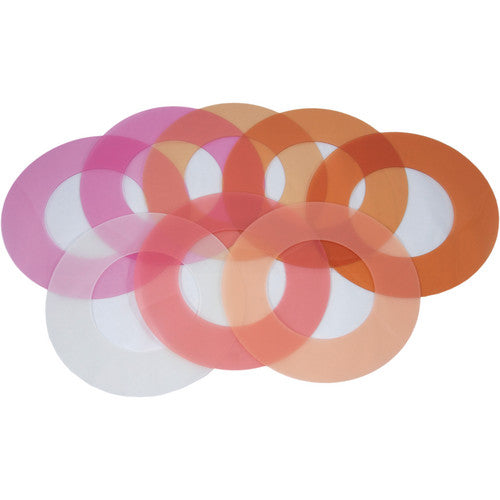

Rosco LitePad Loop Colour Pack — 8 pre-cut gels
Eight pre-cut gels for the LitePad Loop ring light that attach with the Loop’s magnetic accessory collar. The pack covers CTO warming, Minusgreen for fluorescent balancing and cosmetic filters for flesh tones.

Image: Rosco
Correct and flatter, right at the lens
Because the Loop sits around the lens, the colour of its light matters on every close-up. These gels let you match it to the scene and the subject.
- Warms colour temperature with CTO filters
- Balances to fluorescent with Minusgreen
- Enhances flesh tones with cosmetic filters
Close-ups, interviews and portraits
Interviews
Match the Loop to tungsten or mixed practical light in the room.
Beauty & portrait
Cosmetic filters for flattering skin tones in close-up.
Mixed lighting
Minusgreen to sit the Loop alongside fluorescent sources.
What it is — and what it isn’t
Use it for
- Rosco LitePad Loop ring light
- Quick colour correction on camera
- Warming and skin-tone work in close-up
Don’t use it for
- Other LitePad models — these are cut for the Loop
- Fixtures without the Loop’s magnetic accessory collar
- Strong saturated colour effects — this is a correction pack
Getting the best result
- Choose the gel for the scene: CTO, Minusgreen or cosmetic.
- Place it on the Loop and secure it with the magnetic accessory collar.
- Check skin tones and white balance on the monitor.
- Store unused gels flat to keep them clean and unscratched.
Key details
| Fits | Rosco LitePad Loop |
|---|---|
| Contents | 8 pre-cut gels |
| Filter types | CTO (warming), Minusgreen, cosmetic |
| Attachment | Loop magnetic accessory collar |
| Rosco code | 291200000008 |
Common questions
What’s in the LitePad Loop Colour Pack?
Eight pre-cut gels: CTO filters for warming, Minusgreen for balancing to fluorescent light, and cosmetic filters for enhancing flesh tones.
How do the gels attach to the Loop?
They fit with the Loop’s magnetic accessory collar — no tape needed.
Can I use these gels on other LitePads?
They’re cut for the Loop’s ring shape. For other LitePads, use the colour filter pack sized for your panel.
Colour results depend on your camera settings and other light in the scene — test on camera first. Information is a guide only.
Planning a LitePad setup?
Tell us which LitePads you’re running and how you want to power them, and we’ll help you choose the right supply, cables and mounts.